
Sit-Stand Desk Cable Planning Before Installation
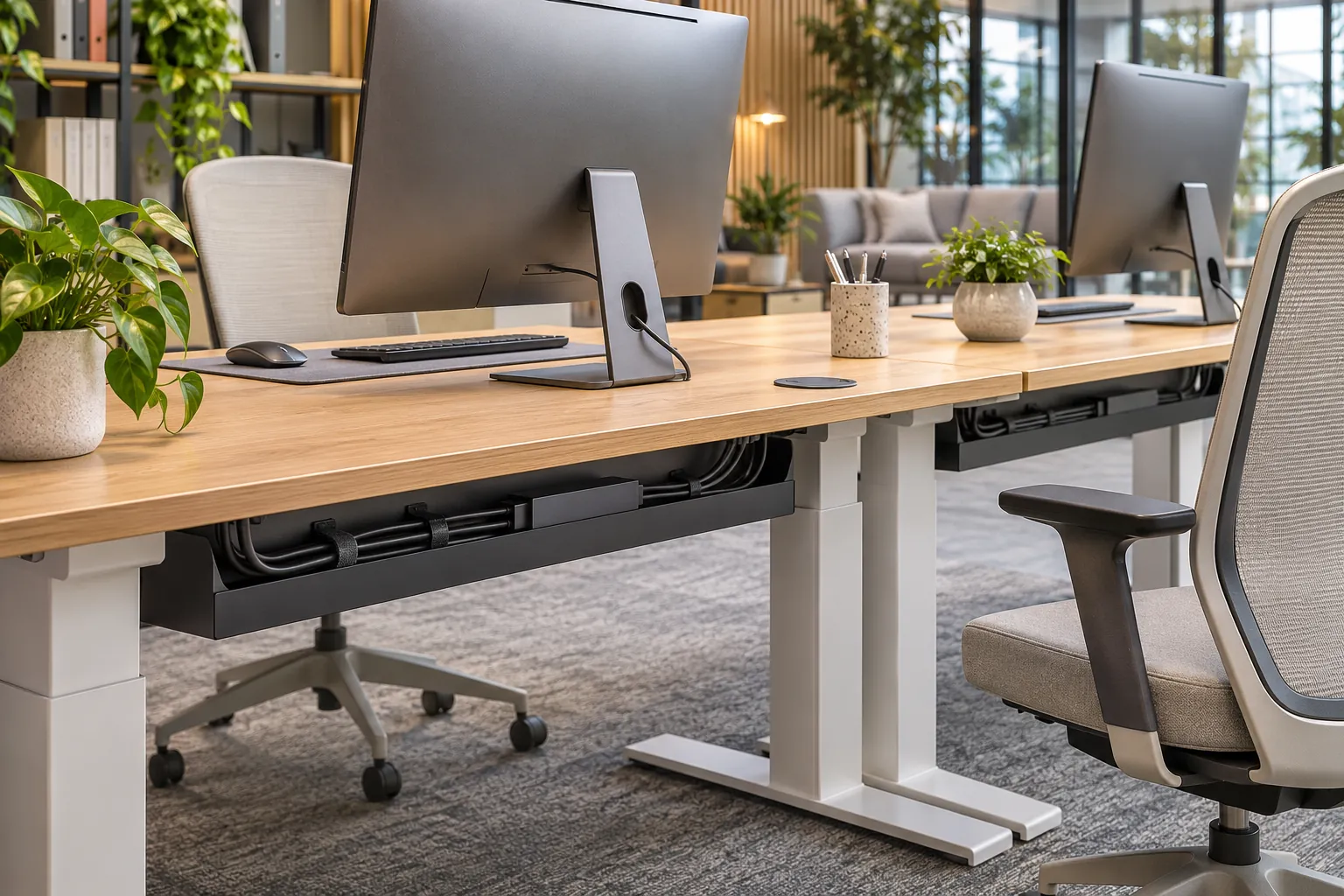
Plan a height-adjustable desk with cables throughout its full approved movement. A tidy setup at the lowest position can pull plugs or trap cables when raised. Coordinate the desk, monitor supports and floor connections before installation.
List every moving connection
Include monitor, laptop power, docking, telephone and accessories. Distinguish equipment that moves with the desk from fixed floor or wall connections. The shortest-looking cable route may leave insufficient slack at the highest setting.
Check the entire travel
Use the supplied desk’s approved height range and equipment limits. Inspect cable tension, pinch points and collisions during a supervised setup check. Keep overhead shelves and nearby window ledges within the collision review.
Confirm accessories and fixing
Ask whether cable trays, vertical management and monitor-arm provisions are included or optional. Review the approved attachment method and desktop suitability. Adding accessories without checking their compatibility can create clearance or loading problems.
Document the handover
Give users clear operating and cable-change instructions from the supplier. Recheck connections after equipment changes. A desk movement feature does not automatically correct every workstation issue, so evaluate the complete task arrangement.
Separate fixed and moving equipment
List every device on or near the desk. Identify which parts rise with the desktop and which remain fixed at a wall, floor or neighboring cabinet. The cable transition between them is the critical planning area. A tidy route at sitting height can pull on connectors when the desk rises.
Include accessories such as monitor arms, docking equipment and telephone cables. Check whether each device has its own power supply or adapters. Avoid assessing the desk with only an unplugged laptop if the real workstation will contain a more complex equipment arrangement.
Dimension the full approved movement
Use the height range and equipment limits supplied for the proposed desk. Review the route at the low and high positions and through the movement between them. Keep cables clear of pinch points and moving joints. A sufficient cable length still needs controlled routing so loose loops do not snag.
Check nearby shelves, ledges, storage and the monitor assembly. A collision may involve something above or behind the desktop rather than its frame. Review the workspace with the actual accessories attached. Follow the manufacturer’s setup and operation instructions, including any safeguards provided for that model.
Compare cable-management components
A desk-mounted tray can keep some connections moving with the top. A vertical guide can help organize the route to fixed building services. Ask which components are included, their attachment method and their compatibility with the chosen desk. A photograph showing a neat cable bundle does not establish that the quoted version contains the same accessories.
Check the size of plugs and power supplies as well as cables. A narrow opening may pass a wire but not its connector. Leave service access to the actual connection points. Qualified project parties should confirm electrical components and installation, with furniture openings following their approved details.
Desktop material and accessory fixing
Ask whether the desktop and frame support the intended monitor arm and fixing position. Review the actual clamp or mounting method, equipment and supplier limits. A thin edge, decorative profile or concealed component can affect where an accessory attaches. Resolve that position before drilling or adding hardware.
Keep the total equipment arrangement identified during the trial. Adding screens or changing arms later can alter movement and cable requirements. Facilities should have the approved configuration and the relevant instructions available when an employee changes equipment.
Inspection and acceptance through a supervised setup check
Connect the intended devices and follow the supplier’s normal setup process. Have a responsible installer observe cable slack, connector tension and interference through the approved travel. Stop and resolve a problem rather than pulling harder or relying on a cable to stretch. Record the final routing with photographs that show both moving and fixed ends.
Check that the desk operates as supplied and that the accessories match the quotation. Ask for relevant documentation for any stated requirement. A movement feature does not establish that every workstation issue is resolved, so assess seating, equipment placement and user tasks alongside it.
Cleaning, maintenance and changes
Keep access to trays and guides practical for cleaning and servicing. Avoid placing liquids or unsuitable cleaning methods near powered components. Follow the desk and equipment instructions. Recheck routing after devices are replaced, cables are shortened or the desk is moved.
Sit-stand RFQ checklist and risk review
- Desk reference, approved movement and desktop construction.
- Complete equipment and monitor-arm list.
- Fixed power or data positions.
- Trays, guides, openings and included accessories.
- Nearby collision points and installed layout.
- Setup instructions and acceptance observations.
The main risk is checking one parked height and treating it as proof for the entire movement. Inspect the travel with real connections. Another risk is adding accessories based on appearance without confirming their fixing compatibility.
Questions about moving-desk cables
How much cable slack is needed?
Use the actual desk travel, equipment and routing. There is no universal spare length for every arrangement. Check both extremes and the path between them.
Does a cable tray solve the whole problem?
It organizes part of the setup. The transition to fixed services still needs review, along with connectors, guides and any potential interference.
Can any monitor arm be added?
Confirm the desktop construction, fixing position and manufacturer guidance for the proposed arm and equipment. Review movement and cable routing afterward.
When should routing be checked again?
After equipment changes, moving the workstation or altering cable length and management. Keep the original reference photographs and instructions available.
What belongs in acceptance evidence?
Identify the actual desk and accessories, equipment arrangement and observed movement. Record the final cable path and any remaining issue before handover.
Review office desk references and workstation planning references. Send your office furniture requirements for a project-specific proposal.